The dashboards
Twelve Grafana dashboards, each answering a different question, plus a set of rebuilt copies parked beside their originals. Every panel carries a description saying what it measures, how it is computed, and how to read it — hover the ⓘ rather than guessing.
💡 Before reading any of them
Two pages decide whether these numbers mean what they appear to:
- Agent capabilities — an empty panel is usually one agent not reporting a field, not a bug
- What the numbers mean — several figures are wrong in a flattering direction if defined casually
Executive Summary
Question: is AI-assisted work happening, and is it going anywhere?
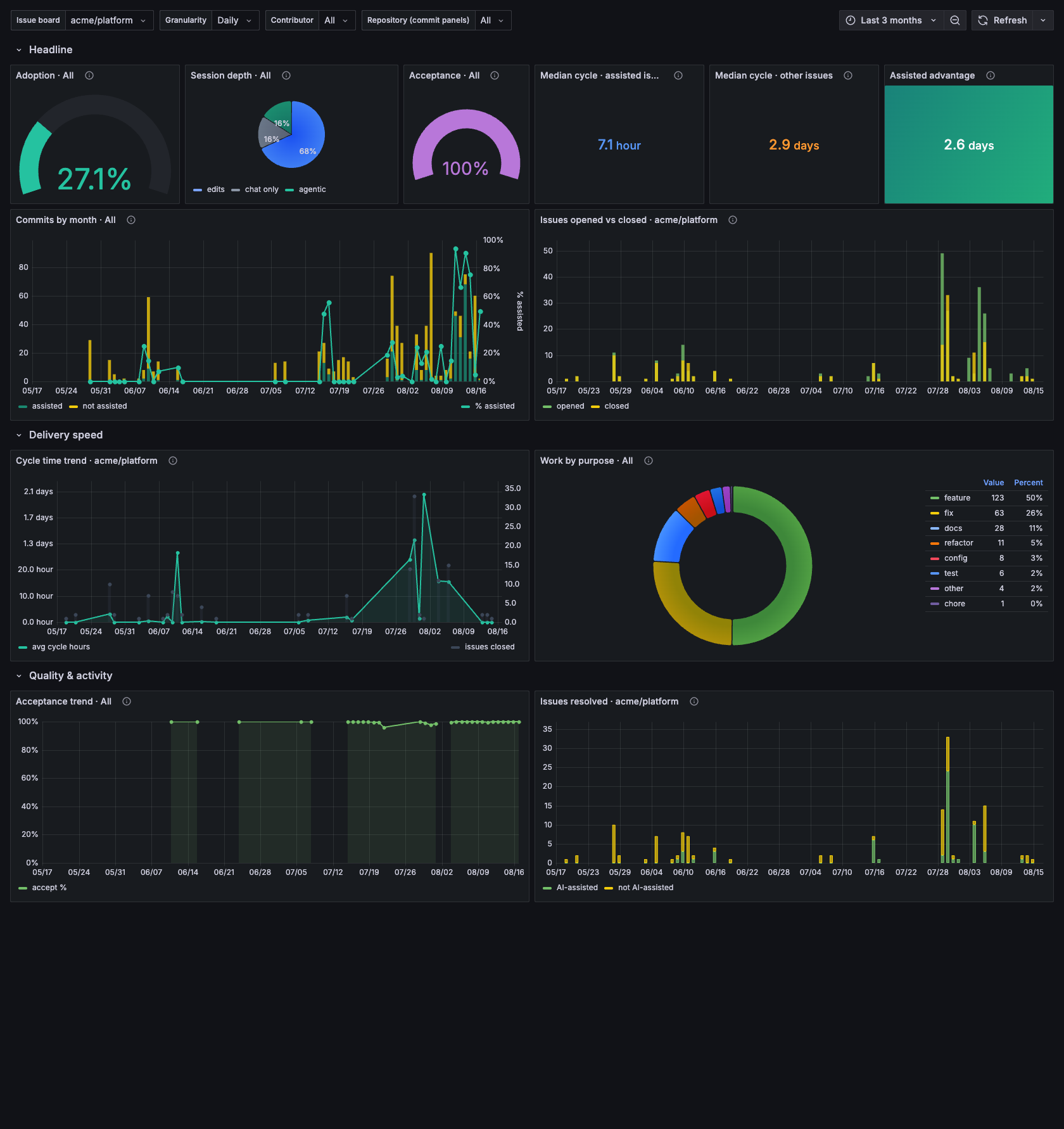
Assisted commits, attribution coverage, acceptance rate and the cycle-time comparison, with the issue-level detail beneath it.
The one-screen version. Assisted commit count, attribution coverage, acceptance rate, active sessions, and the trend of each. Built for someone who will not open the other six.
Adoption
Question: who is using agents, on what, and how much?
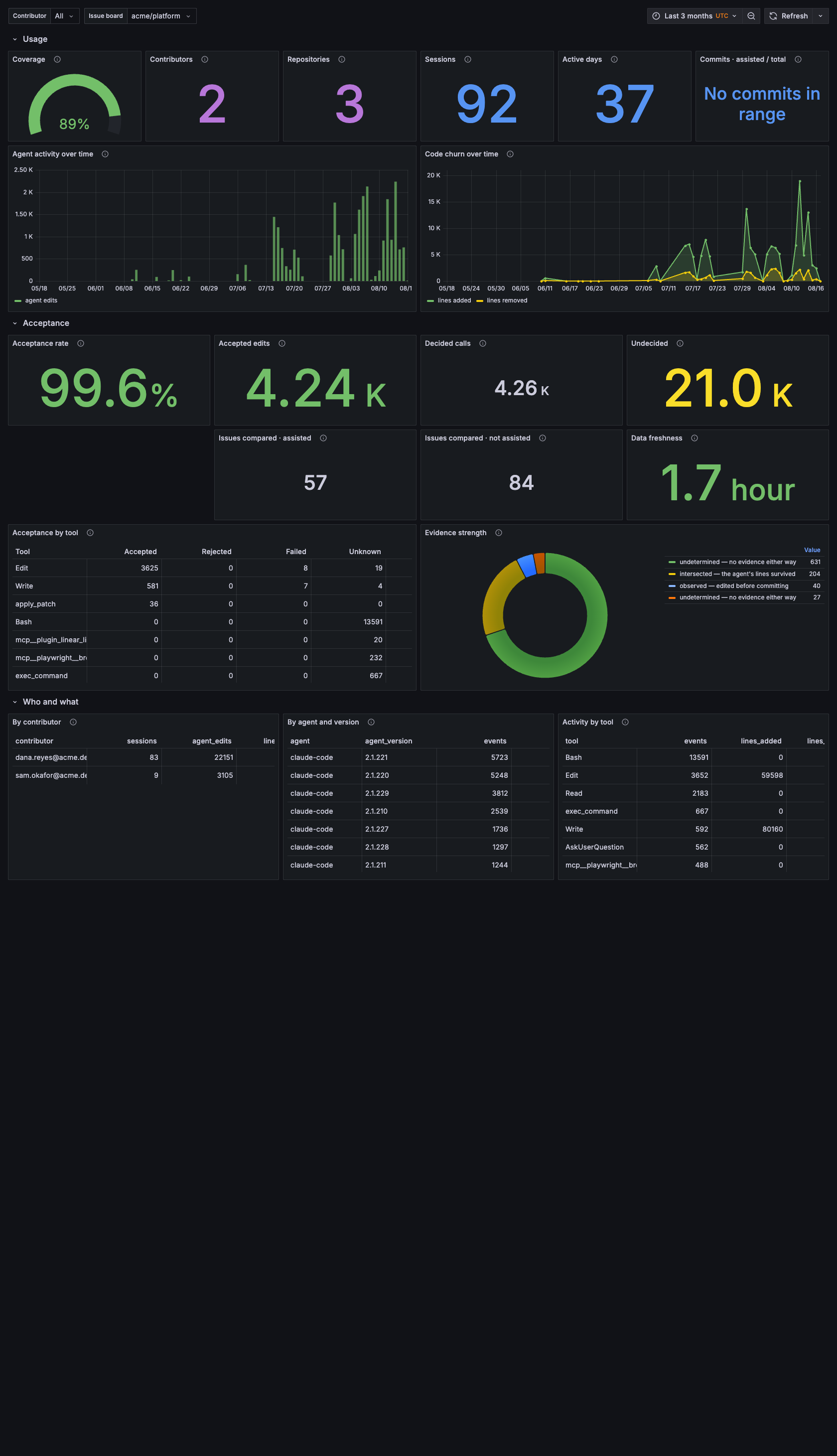
Sessions, contributors, lines written and acceptance — the denominators every other dashboard divides by.
Per repository and per contributor: sessions, agent edits, lines written, acceptance rate by tool, and the mix of agents in use. This is the denominator dashboard — where you check whether a figure elsewhere rests on three sessions or three hundred.
Cost & Efficiency
Question: what did it cost, in tokens, and where is that wasted?
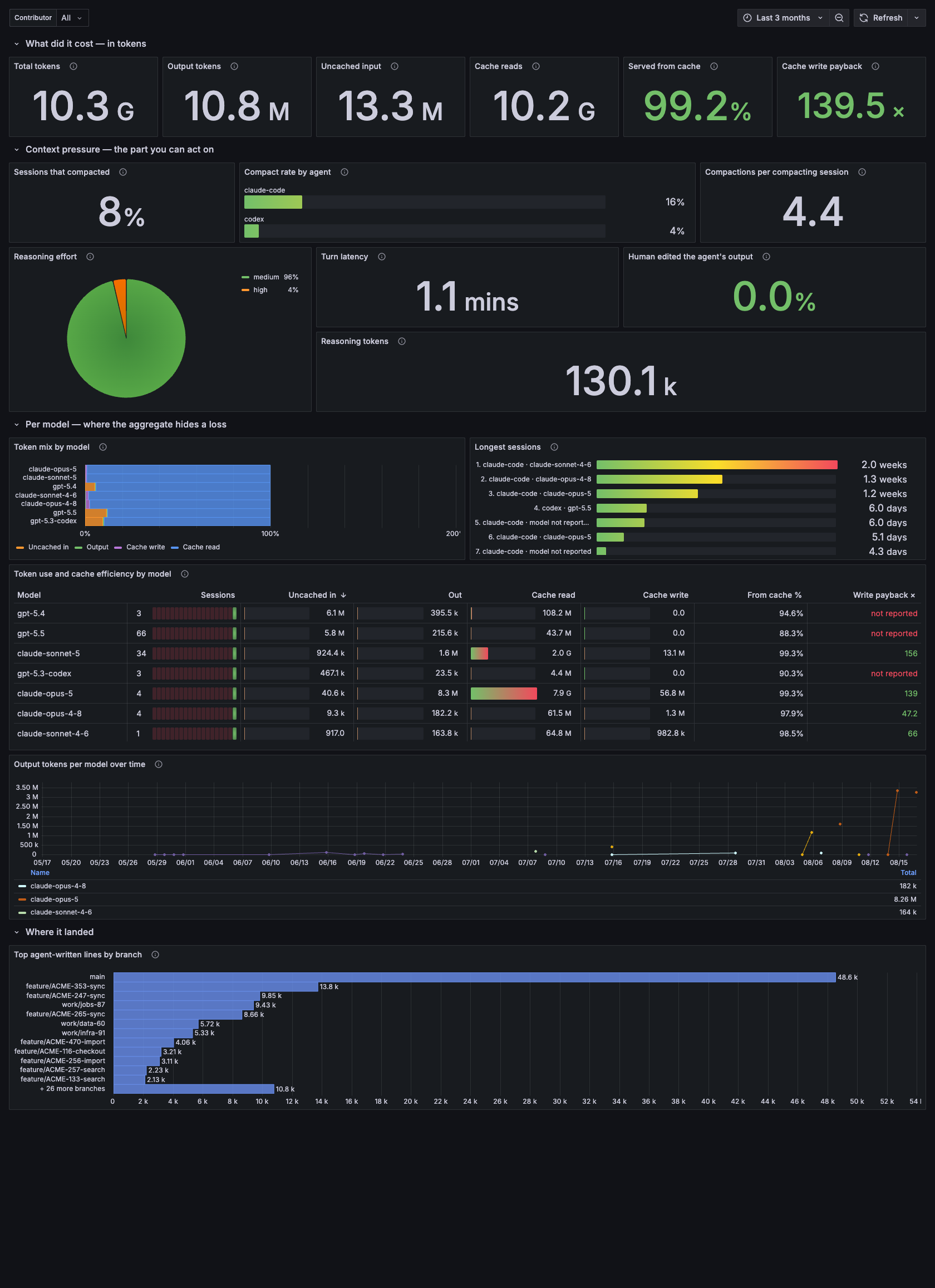
Token totals, cache economics and context pressure. Note the cache write payback figure, which breaks even at 1.25x rather than 1.0x.
Token use per model, cache read ratio, cache write payback with break-even drawn at 1.25x, context pressure and compaction rate, reasoning effort, turn latency, and the share of edits a human changed before committing.
The panel worth opening first is write payback per model: measured here, the aggregate was a healthy 3.60x while one model sat at 0.73x — a loss, entirely invisible in the total.
Structurally empty for Antigravity, which reports no tokens at all. The panels say so rather than rendering zero.
AI Impact on Delivery
Question: does assisted work ship differently?
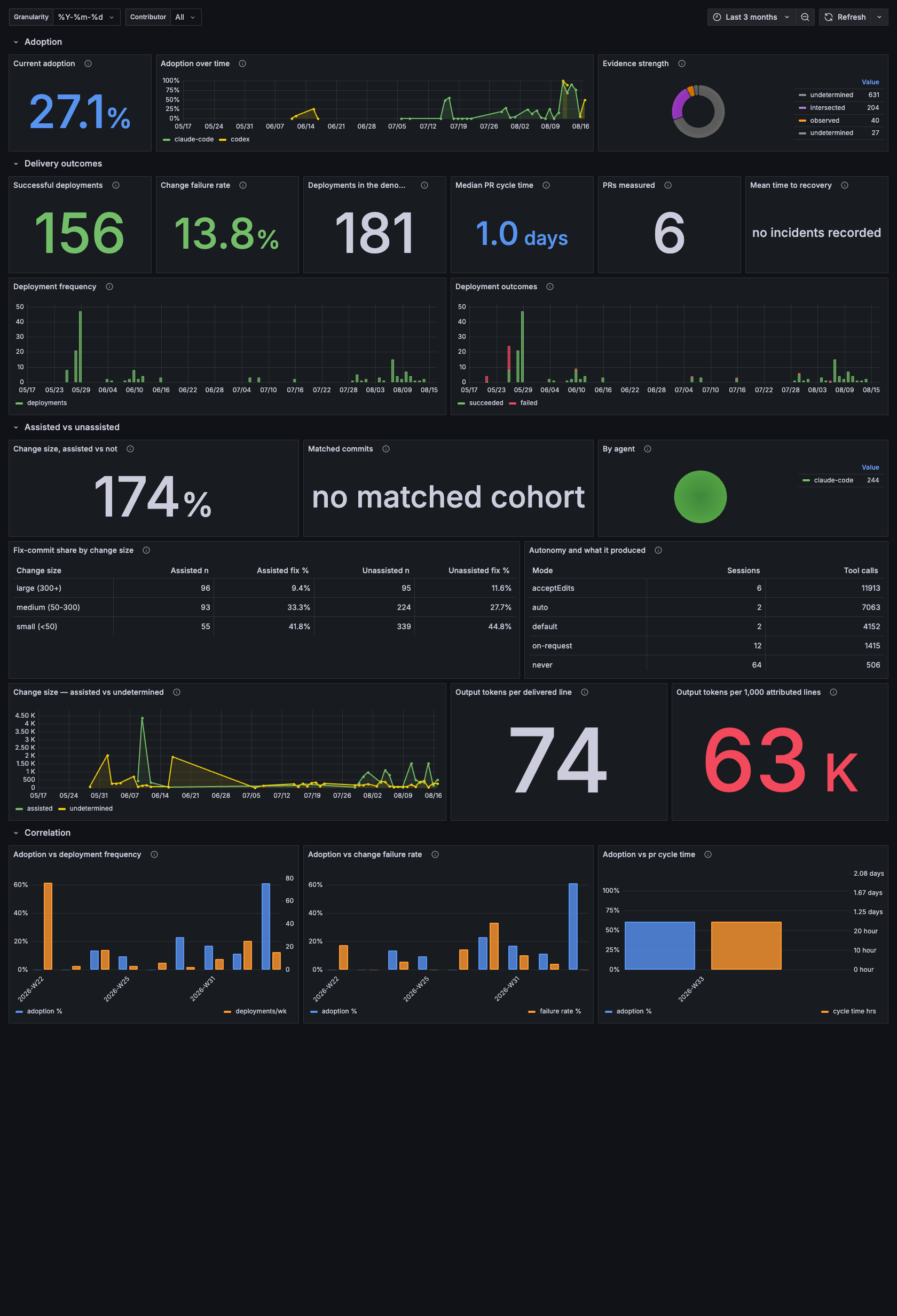
Adoption leads, because it is the denominator for everything below it; DORA delivery outcomes follow.
DORA-style delivery outcomes alongside adoption: deployment frequency, change failure rate, cycle time, and rework rate for assisted versus unassisted commits, matched by change size.
Read the caveat on every panel. This dashboard reports a difference, not a gain — assisted and unassisted commits are self-selected, so part of what it shows is which work people chose an agent for.
AI Productivity Funnel
Question: where does agent usage stop converting?
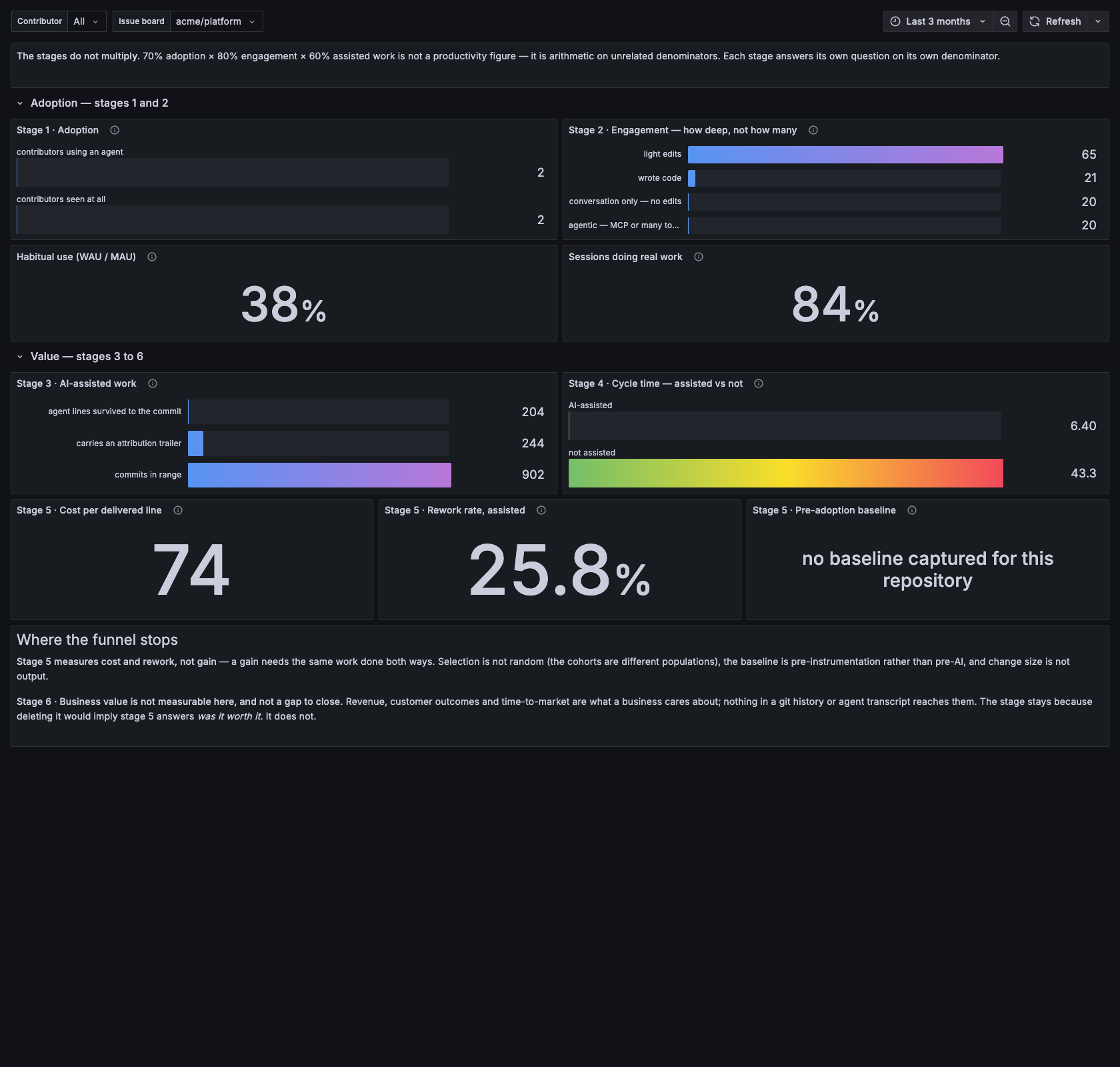
Six stages, each measured on its own — the header states plainly that they do not multiply.
Adoption → engagement → assisted work → acceptance → value. Each stage narrows, and the stage where it narrows most is the one worth acting on.
Stages that cannot be measured from the available data say so rather than being filled with a proxy.
Agent Activity Hours
Question: when is the work happening?
Agent edits by hour and weekday. Useful for spotting long-running background sessions, and for noticing that a "productive week" was one overnight batch job.
AI attribution
The original dashboard: coverage, method mix, and per-commit detail. Superseded in practice by Executive Summary but kept because it is the one that answers "is the instrumentation itself working".
Team Adoption
Question: how does adoption differ by team, and how does each team use the tool?
Adoption, evidence strength, agent and model mix, permission mode and reasoning effort, each split by team; and a within-team view of how evenly the tool is used. Teams come from your config or DevLake — see Teams and identities.
A rollout view built beside it adds how fast each team got there, the spread inside each team, who has not started, and adoption against acceptance per team.
MCP & Tools
Question: which integrations are being adopted, and by whom?
MCP servers called, share of calls, which server each team uses, the tools called most within each, and built-in tools for comparison. Server names are normalised across agents so the same integration reads as one bar.
Productivity
Question: is assisted work more productive — under which definition, and does the answer survive conditioning?
Five definitions of output over effort side by side; the same difference pooled and conditioned on work type and complexity; a grid of every cell; each person against themselves; and the trend over time. The reasoning is Measuring productivity. Every panel says difference, not gain.
Investment Case
Question: what does the spend buy, and what would it have to save to pay for itself?
Typed assumptions at the top — seats, seat cost, developer hour — and measured quantities everywhere else. Seat utilisation, cost per assisted commit and issue, break-even in hours and minutes, an ROI sensitivity grid, one labelled hypothesis, and token spend priced per model from the providers' own pricing pages. The reasoning is The investment case.
Delivery Forecast
Question: how fast do tasks close per head, is the backlog draining, and when?
Throughput per person-week before and after adoption, backlog and net flow, a burn-up with projection, drain dates under three rates, and productivity per task; per team and per person beneath. The assumptions are Forecasting delivery.
Rebuilt copies, parked in TBD
Several dashboards have a rebuilt version beside the original — Adoption,
the executive summary (as a leadership view), the delivery dashboard (as a
board view), Agent Activity Hours, the funnel, attribution and cost. Each
keeps what was only on the original and adds what nothing showed: a
retention strip and time-to-habit on Adoption, a weekday-by-hour grid on
Hours, a funnel that counts people at every stage so conversion means
something, the agent's share of lines as a distribution, cost per line by
model. They sit in a TBD folder until promoted. Screenshots on this page
are of the originals.
Filtering
Every dashboard carries a Contributor filter, and most carry a Team filter that resolves through your teams and identities config. All is the default; the
dropdown also offers (unattributed) for repositories instrumented before
a git identity was configured, so no data is unreachable.
The screenshots on this page were taken against a database whose contributor emails, file paths and branch names had been replaced with demo values first. Nothing on this page is a real address or a real path — these panels do carry both, which is why the data was redacted at source rather than blurred afterwards.